Cloud Calling CRM Integration: How Connected Calling Improves Sales & Support
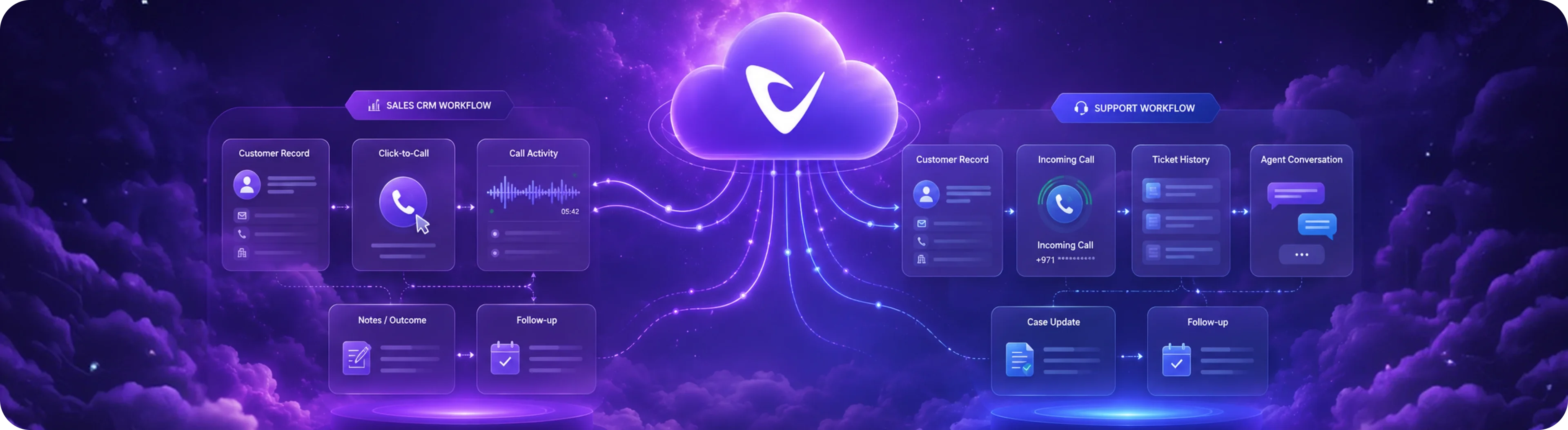
Table of contents
1. What Is Cloud Calling CRM Integration?
2. Why Does CRM Integration Matter for Cloud Calling?
3. How Cloud Calling and CRM Work Together
4. 7 Benefits of CRM-Integrated Cloud Calling
5. 1. Faster Calling and Response
6. 2. Better Customer Context
7. 3. More Consistent Call Logging
8. 4. Stronger Sales Follow-Up
9. 5. Better Support Case Management
10. 6. Better Manager Visibility
11. 7. Less Manual Administration
12. Cloud Calling Integration for Sales Teams
13. Cloud Calling Integration for Customer Support
14. CRM vs Helpdesk: What Should Cloud Calling Connect To?
15. Common Cloud Calling CRM Integration Features
16. What Happens When Cloud Calling Is Not Integrated?
17. How to Choose the Right Cloud Calling Integration
18. Cloud Calling CRM Integration for UAE Businesses
19. How to Improve the Integration After Launch
20. Cloud Calling Is More Than a Phone System
21. Final Thoughts
22. Ready to Connect Cloud Calling With Your CRM and Support Tools?
23. FAQs
Cloud calling becomes much more valuable when it works together with the business systems your teams already use.
A standalone cloud phone system can help employees make and receive calls from almost anywhere. But the call itself is only one part of the customer journey. Sales teams need lead information, customer history, and follow-up tasks. Support teams need ticket history, previous conversations, and case details.
This is where cloud calling CRM integration becomes important.
By connecting cloud calling with CRM, helpdesk, and other business systems, companies can bring voice communication into the same workflow as customer records, sales activities, and support cases.
Instead of treating every call as a separate event, teams can make calls part of a connected customer journey.
For businesses using platforms such as Salesforce, Zoho CRM, Microsoft Dynamics, Bitrix24, Freshworks, Zendesk, or Freshdesk, this can reduce manual work, improve visibility, and make follow-up more consistent.
What Is Cloud Calling CRM Integration?
Cloud calling CRM integration connects a cloud-based business phone system with a customer relationship management platform.
The purpose is simple: allow calling activity and customer information to work together instead of remaining in separate systems.
Depending on the platform and integration, businesses may be able to:
Click-to-call directly from a CRM record
See customer information before answering a call
Log inbound and outbound calls
Associate calls with leads, contacts, accounts, or opportunities
Record call outcomes and notes
Access previous communication history
Improve follow-up after sales conversations
Connect voice activity with customer-support workflows
The exact capabilities depend on the CRM, telephony platform, and integration method.
The important point is that the phone system becomes part of the existing business workflow rather than another disconnected application.
Why Does CRM Integration Matter for Cloud Calling?
A business may already have a CRM and a cloud phone system, but if those platforms do not communicate with each other, employees often have to move information manually.
For example, a salesperson may:
Find a customer in the CRM.
Copy the phone number.
Open the phone application.
Make the call.
Write down notes.
Return to the CRM.
Update the customer record.
Create a follow-up task.
Each individual step may seem small.
Across hundreds or thousands of calls, however, that extra work creates significant operational friction.
With a properly designed CRM calling integration, more of this workflow can happen within connected systems.
The goal is not simply to reduce the number of clicks.
The bigger goal is to make sure important customer information does not get lost between the call and the next business action.
How Cloud Calling and CRM Work Together
A typical connected workflow may look like this:
Customer record → Call → Conversation → Call activity → Notes/outcome → Follow-up
For example, a sales representative opens a lead inside the CRM and initiates a call. After the conversation, the interaction can be associated with that lead so the next activity is easier to understand.
For support teams, the workflow may be:
Customer record → Incoming call → Ticket history → Agent conversation → Case update → Follow-up
This gives employees more context before and after customer interactions.
The exact workflow will vary depending on the business and the tools being integrated.
7 Benefits of CRM-Integrated Cloud Calling
1. Faster Calling and Response
When calling is available directly from customer or lead records, employees spend less time switching between systems.
This can be particularly useful for sales teams handling inbound enquiries where response speed matters.
Instead of searching for a phone number and opening a separate application, the representative can move from customer information to the call more efficiently.
2. Better Customer Context
A phone number alone does not tell an employee much about the person calling.
A connected CRM can provide useful context such as:
Customer or company information
Previous interactions
Lead status
Open opportunities
Previous call activity
Follow-up requirements
Relevant account information
Having this information available at the right moment can help employees have more informed conversations.
3. More Consistent Call Logging
Manual call logging is easy to postpone or forget.
When calling activity can be captured through an integrated workflow, businesses can create a more consistent record of customer communication.
This gives sales managers and support leaders better visibility into what is happening.
It also reduces the risk of important interactions existing only in an employee's memory.
4. Stronger Sales Follow-Up
A sales conversation often creates a next step.
That could be:
Sending a proposal
Scheduling a meeting
Calling again
Sharing additional information
Moving an opportunity forward
When call activity is connected to the CRM, it becomes easier for representatives to maintain that activity history and continue the conversation.
The benefit is not simply more data.
It is better continuity between one interaction and the next.
5. Better Support Case Management
Support teams need more than a phone connection.
They need context.
When cloud calling works alongside a helpdesk or customer-support platform, agents can work with information about previous issues, tickets, conversations, and case status.
This can reduce the need for customers to repeatedly explain the same problem.
It can also make internal handovers easier because the next employee has access to more of the relevant history.
6. Better Manager Visibility
Managers need to understand what is happening across their teams.
Disconnected systems make that difficult.
With connected calling, managers can potentially review information such as:
Call activity
Follow-up patterns
Customer interactions
Sales outreach
Support communication
The available reporting depends on the integration and platform configuration, but connected data generally creates a stronger foundation for operational visibility.
7. Less Manual Administration
Every repetitive manual step adds friction.
Copying phone numbers, entering call information, searching for customer history, and updating multiple systems all consume employee time.
Cloud calling integration can reduce some of this administrative work and allow employees to spend more time on customer conversations and higher-value activities.
Cloud Calling Integration for Sales Teams
Sales teams are one of the clearest use cases for CRM-connected calling.
Sales representatives often make many calls during the day. They also need to manage leads, opportunities, follow-ups, meetings, and customer information.
When the phone workflow is separate from the CRM, representatives may spend unnecessary time moving information between systems.
A connected setup can support workflows such as:
New lead → CRM record → Call → Outcome → Follow-up → Opportunity
This is especially useful for businesses that depend on fast responses to inbound enquiries.
A connected calling workflow can help sales teams:
Respond to leads faster
Access customer context before calls
Maintain clearer activity histories
Reduce repetitive data entry
Improve follow-up consistency
Give managers better visibility
Voiger's sales-team approach also focuses on CRM-connected calling and call activity visibility as part of a broader sales workflow.
Cloud Calling Integration for Customer Support
Support teams have different requirements from sales teams.
Their priority is often not simply making more calls. It is resolving customer issues efficiently and maintaining context throughout the support journey.
Consider a customer who has already opened several tickets.
If that customer calls again and the agent cannot see the previous history, the customer may have to repeat information.
A connected cloud calling and helpdesk workflow can help bring together:
Customer information
Ticket history
Previous interactions
Call activity
Case status
Follow-up actions
This can make customer support more consistent and reduce unnecessary repetition.
CRM vs Helpdesk: What Should Cloud Calling Connect To?
The right integration depends on the team's workflow.
CRM Integration
CRM integration is usually most relevant for:
Sales teams
Lead management
Account management
Business development
Customer relationship management
Pipeline management
Examples include Salesforce, Zoho CRM, Microsoft Dynamics, Bitrix24, and Freshworks/Freshsales.
Helpdesk Integration
Helpdesk integration is more relevant for:
Customer support
Technical support
Ticket management
Complaint handling
Case management
Service operations
Examples include Zendesk and Freshdesk.
Some businesses need both.
In that case, the cloud calling platform becomes a communication layer connecting voice activity with multiple parts of the customer journey.
Voiger currently positions its platform around integrations with CRM and support systems including Salesforce, Zoho CRM, Zoho Desk, Zendesk, Freshdesk, Microsoft Dynamics, and Bitrix, alongside API-based connectivity for custom workflows.
Common Cloud Calling CRM Integration Features
When evaluating a solution, businesses should look beyond the word "integration."
Different platforms can provide very different levels of connectivity.
Important capabilities to evaluate include:
Click-to-Call
Can employees initiate calls directly from customer or lead records?
Caller Identification
Can the system identify a customer or contact when an incoming call arrives?
Automatic Call Logging
Can call activity be captured without requiring employees to manually enter every interaction?
Customer Context
Can employees access relevant customer information before or during the conversation?
Call Outcome Tracking
Can teams record what happened during the call and what needs to happen next?
Support Ticket Association
Can calls be connected to the appropriate support case or ticket?
Reporting
Can managers understand calling activity and outcomes through useful dashboards or reports?
API and Custom Integration
Can the platform connect to internal applications or workflows that are not supported by a standard integration?
These questions are more useful than simply asking whether a vendor "supports CRM integration."
What Happens When Cloud Calling Is Not Integrated?
Disconnected systems can create small problems that become significant at scale.
Common examples include:
Employees switching between multiple applications
Customer information being difficult to find
Calls not being logged consistently
Follow-up tasks being missed
Support history being difficult to access
Managers having incomplete activity data
Customers repeating information
Teams spending more time on administration
The phone system may still work perfectly.
The problem is the workflow surrounding the phone call.
That distinction is important.
A business does not necessarily need more telephony features. It may need better connectivity between the communication system and the tools employees already depend on.
How to Choose the Right Cloud Calling Integration
Before choosing a platform, evaluate the integration from the perspective of actual employees.
Ask these questions:
1. Does It Work With Our Existing CRM?
Avoid choosing a platform first and discovering later that the required CRM integration is limited.
2. What Information Is Shared?
An integration may technically exist while providing very little useful data.
Understand exactly what information can move between systems.
3. Can Calls Be Logged Automatically?
Determine whether call activity can be captured automatically and how call outcomes are handled.
4. Can Employees Access Customer Context?
The value of integration increases when employees can access useful information at the right time.
5. Does It Support Our Support Workflow?
If your business uses a helpdesk, check whether calls can work with tickets, cases, and customer history.
6. Is There API Support?
API connectivity can be important when your business relies on custom applications or internal workflows.
7. Can It Scale?
The integration should continue to work as the company adds more employees, customers, workflows, and systems.
Cloud Calling CRM Integration for UAE Businesses
For businesses in the UAE, integration is only one part of the decision.
Companies should also consider their communication infrastructure, existing numbers, carrier setup, regulatory requirements, hosting arrangements, and support needs.
A modern cloud contact centre can bring together calling, routing, analytics, CRM connectivity, and customer-support workflows without necessarily requiring a business to rebuild everything from scratch.
Voiger positions its platform specifically for UAE businesses and supports CRM and helpdesk integrations alongside cloud calling, routing, analytics, BYOC, and other contact-centre capabilities.
For companies already using existing numbers or carrier relationships, it is also worth evaluating whether the provider supports an appropriate BYOC or number-continuity model.
How to Improve the Integration After Launch
Integration should not be treated as a one-time technical project.
After launch, businesses should monitor how employees actually use the workflow.
Start by reviewing:
Are calls being logged correctly?
Are employees using click-to-call?
Are customer records being updated?
Are follow-up tasks being completed?
Are support cases linked correctly?
Are managers receiving useful reports?
Are employees still switching between unnecessary systems?
The answers can reveal where the integration is creating value and where the workflow needs improvement.
A good integration should make the employee's job easier, not simply add another layer of software.
Cloud Calling Is More Than a Phone System
The biggest shift in modern business calling is that voice no longer has to operate as an isolated channel.
A customer interaction may start with a website enquiry, continue through a sales call, move into a CRM opportunity, and eventually become a support conversation.
If those stages remain disconnected, valuable context can disappear.
When voice works together with CRM and support platforms, businesses can create a more connected customer journey.
That means the real question when evaluating cloud calling should not simply be:
"Can this system make and receive calls?"
A better question is:
"Can this system connect our calls with the workflows our teams already use?"
That is where CRM-connected cloud calling can create much more practical value.
Final Thoughts
Cloud calling CRM integration can help businesses connect voice communication with the systems that manage customer relationships, sales activity, and support operations.
For sales teams, this can mean faster outreach, better customer context, cleaner activity tracking, and stronger follow-up.
For support teams, it can mean better access to customer history, improved case visibility, and more consistent service.
For managers, connected data can provide a clearer view of team activity and customer interactions.
The right solution is not necessarily the one with the longest feature list.
It is the one that fits naturally into the way your business already works.
Ready to Connect Cloud Calling With Your CRM and Support Tools?
Voiger helps businesses build connected voice workflows for sales and support teams, with cloud calling, CRM and helpdesk integrations, intelligent routing, analytics, and scalable contact-centre capabilities.
If you want to see how cloud calling could fit into your existing business systems, book a demo with Voiger and discuss your current CRM, helpdesk, carrier, and communication workflow.

Frequently asked questions
Everything you need to know about Voiger Voice Platform.
Cloud calling CRM integration connects a cloud phone system with a CRM so teams can use customer information and calling activity within a more connected workflow.
Key benefits can include faster calling, better customer context, more consistent call logging, stronger follow-up, less manual administration, and better visibility for managers.
Many cloud calling platforms support integrations with major CRM systems, but the available features vary by provider. Businesses should verify exactly what information and calling functions are supported before choosing a solution.
Yes, cloud calling can be connected with helpdesk platforms such as Zendesk and Freshdesk, depending on the provider and integration setup.
Integration alone does not guarantee better sales results. Its value comes from reducing workflow friction, improving access to customer context, and helping teams manage calling and follow-up more consistently.
Yes. SMB and mid-market teams can benefit because connected workflows can reduce repetitive administration and provide better structure without requiring a large operations team.
Check CRM compatibility, available integration features, call logging, click-to-call functionality, customer context, helpdesk connectivity, reporting, API support, scalability, and the provider's implementation and support model.
Voiger supports integrations with CRM and support platforms including Salesforce, Zoho CRM, Zoho Desk, Zendesk, Freshdesk, Microsoft Dynamics, and Bitrix, with API-based connectivity for custom workflows.
How to Add AI Call Analytics Without Replacing Your Current Voice Setup
April 2, 2026

What to Look for in a Call Masking Solution for UAE Marketplaces and Delivery Businesses
March 31, 2026
How AI Voice Bots Can Help Businesses Reduce Missed Leads After Business Hours
March 26, 2026