How Sales Teams Can Respond Faster with CRM-Connected Calling and Auto Call Logging
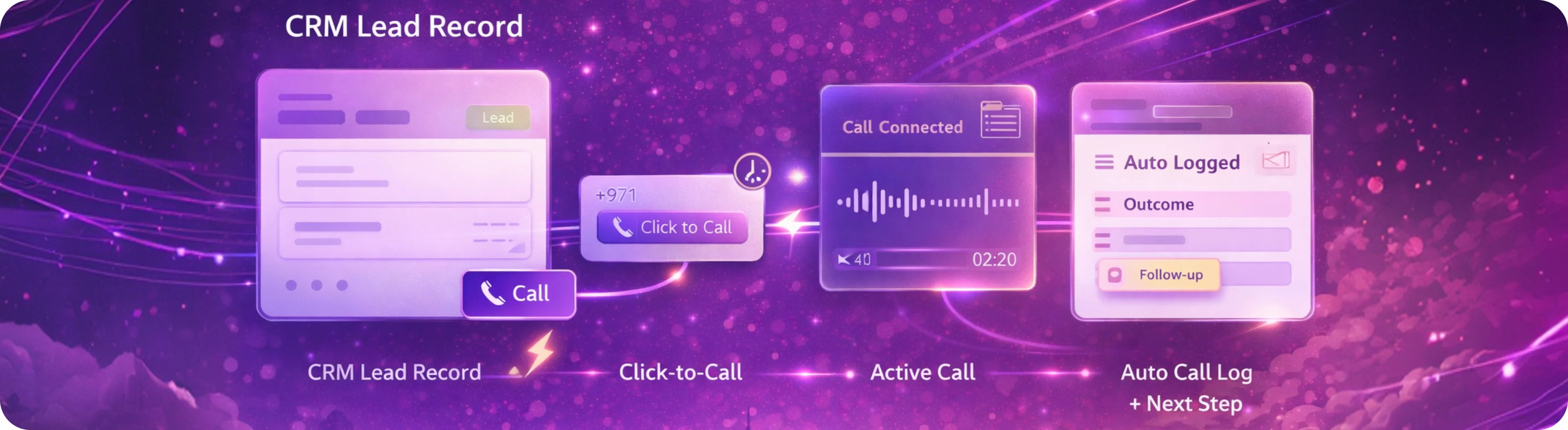
Table of contents
Speed matters in sales.
The faster a business responds to an inbound enquiry, the stronger its chances of turning interest into a real opportunity. The faster a rep follows up after a missed call, the less likely that lead is to go cold. The faster managers can see what is happening in the pipeline, the easier it becomes to improve performance.
But many sales teams still work with disconnected systems.
Calls happen in one place. Lead records sit somewhere else. Notes are added later, if they are added at all. Reps move between tabs, copy numbers manually, and rely too much on memory to manage follow-up.
That creates delay.
And in sales, delay usually means lost momentum.
This is why CRM-connected calling and auto call logging have become increasingly important. They help sales teams move faster, reduce manual admin, and create more structure around customer interactions.
If your business is looking at ways to improve sales responsiveness, here is why this matters.
Ready to See What a Low-Friction Setup Could Look Like?
UAE-built cloud contact centre from AED 299/month. Etisalat & du integration, TDRA-compliant, GCC hosting. BYOC/BYOB, AI voice & analytics, 24/7 UAE support. Go live in 5 days.

Why Sales Speed Often Breaks Down
Most sales teams do not struggle because they lack effort.
They struggle because their workflow adds friction.
A rep may receive a lead, but calling that lead is not immediate because the phone workflow is separate from the CRM. A conversation happens, but the context is not captured properly. A callback is needed, but there is no clear activity trail in the record. Managers want to understand performance, but the data is incomplete.
This leads to common issues such as:
slower first response time
inconsistent follow-up
missed callbacks
weak activity visibility
incomplete lead records
more manual admin for reps
less confidence in pipeline reporting
These are not just process problems.
They are revenue problems.
What CRM-Connected Calling Actually Means
CRM-connected calling means the voice workflow is linked to the customer record, lead record, or sales activity workflow that the team already uses.
Instead of making calls in isolation, the rep works in a more connected flow.
That may include:
clicking to call directly from the CRM
viewing lead or account context before answering or calling
logging call activity against the record
capturing outcomes more clearly
reducing the need to enter the same information manually
helping managers review activity with more confidence
The goal is not just to make calling easier.
The goal is to make every sales interaction easier to manage and easier to act on.
What Auto Call Logging Does
Auto call logging helps capture call activity in a more structured way without relying entirely on manual updates.
That matters because manual logging often breaks down in real sales environments.
Reps are moving fast. Calls happen back-to-back. Priorities shift quickly. By the time someone plans to update the CRM, the next conversation has already started.
That is how records become incomplete.
Auto call logging helps reduce that gap by making it easier for the system to record that an interaction happened and connect that activity to the correct lead, contact, or account workflow.
This creates stronger visibility for both reps and managers.
Why Faster Response Matters So Much
A slower response does not just create operational inefficiency.
It changes buying outcomes.
If a lead enquires through your website, calls the business, or requests a callback, the speed and structure of your response can heavily influence what happens next.
When response time slows down, businesses often face:
lower lead conversion
weaker first impressions
more lost opportunities to competitors
poor handover between SDRs, AEs, or managers
less visibility into where leads are dropping
For sales-led businesses, this is one of the most important reasons to connect calling with CRM.
It helps reduce the delay between enquiry, outreach, follow-up, and action.
Where Sales Teams Usually Lose Time
Disconnected workflows create invisible time loss throughout the day.
That can show up in small but important ways:
Searching for Customer Information
Reps waste time switching between systems to understand who they are calling and what happened previously.
Dialing Manually
When numbers need to be copied or entered manually, speed drops and friction increases.
Writing Notes After the Fact
If notes are added later, they may be delayed, incomplete, or forgotten.
Missing Follow-Up Context
The next rep or manager may not know what happened on the last call.
Weak Activity Reporting
Managers may struggle to understand call effort, follow-up patterns, or rep responsiveness clearly.
These issues become bigger as the team grows.
How CRM-Connected Calling Improves Sales Workflow
When calling is connected to CRM, the workflow becomes more useful from the start of the sales cycle to the end.
1. Faster Outreach
Reps can move from lead review to calling more quickly when the workflow is connected.
This helps reduce delay, especially for inbound or high-intent leads.
2. Better Context Before the Call
A rep can work with the lead’s details, company context, previous activity, or pipeline information before making contact.
That helps create a stronger conversation.
3. Cleaner Follow-Up
When calls are easier to track, follow-up becomes more structured.
That means fewer missed next steps and less reliance on memory.
4. Better Team Coordination
If multiple people are involved in the sales cycle, connected calling helps them understand what happened previously and what should happen next.
5. Better Visibility for Managers
Managers can review activity with greater confidence when calls and records are linked more clearly.
That supports coaching, forecasting, and pipeline discipline.
Why Auto Call Logging Matters for Growing Teams
A small team may be able to survive on informal habits for a while.
But once the sales function grows, manual discipline alone is not enough.
Managers need a clearer answer to questions like:
how quickly are new leads being called?
how many follow-up attempts were made?
which reps are most consistent?
where are leads going cold?
which opportunities need management support?
Without structured call activity, these answers become harder to trust.
Auto call logging helps sales teams create a stronger operating foundation without forcing reps to spend even more time on admin.
That is one of the biggest benefits.
Why This Is About More Than Productivity
It is easy to frame this as a productivity issue.
But it is really bigger than that.
Connected calling and cleaner logging improve:
responsiveness
lead conversion discipline
customer experience
internal coordination
pipeline visibility
management confidence
That is why this kind of setup matters.
It is not just about saving time.
It is about helping the sales team operate more effectively from first contact to opportunity progression.
Common Use Cases Where This Helps Most
This model is especially useful in sales environments where speed and follow-up quality matter.
Inbound Lead Handling
When a new lead comes in, reps can respond faster and with better context.
SDR or BDR Follow-Up
Teams running outbound or follow-up sequences can manage activities more consistently.
Multi-Step Sales Cycles
Where several conversations happen over time, clean activity history matters more.
Team-Based Selling
If more than one rep or manager is involved, connected records reduce internal gaps.
SMB and Mid-Market Sales Teams
Lean teams benefit significantly when systems help them stay organised without creating more admin.
What Businesses Should Look For
If your goal is faster sales response and cleaner call visibility, here are the most important things to evaluate.
1. Easy CRM Integration
The calling workflow should fit naturally into the systems the team already uses.
2. Click-to-Call Simplicity
The easier it is to launch calls from the record, the faster reps can act.
3. Useful Activity Logging
The setup should create clear visibility into call activity without depending entirely on manual updates.
4. Better Context for Reps
Sales teams should be able to work with lead or customer information before and after each call.
5. Reporting That Managers Can Use
Leaders should be able to review responsiveness, activity patterns, and follow-up quality more clearly.
6. Fit for Real Sales Workflows
The system should help the team move faster without making the process feel heavier.
Why This Matters for SMB and Mid-Market Businesses
Large enterprises may have bigger RevOps teams, more complex tooling, and dedicated process owners.
SMB and mid-market teams usually need something more practical.
They need:
faster time to value
less manual admin
better control over lead response
clearer visibility without more complexity
systems that support reps instead of slowing them down
That is why CRM-connected calling is so useful in this segment.
It helps growing sales teams operate with more discipline without needing heavy process overhead.
A Smarter Way to Think About Sales Calling
Sales calling should not be treated as a separate activity from pipeline management.
It should be part of the same workflow.
The question is not just:
“Can our reps make calls?”
The better question is:
“Can our reps make calls in a way that improves response time, follow-up, and visibility across the sales process?”
That is where the real value comes from.
The Bottom Line
Sales teams respond faster when calling is connected to the systems they already use.
CRM-connected calling and auto call logging help reduce workflow friction, improve lead response, strengthen follow-up, and create better visibility for both reps and managers.
For businesses that care about speed, structure, and sales discipline, this is not a small process improvement.
It is a better way to run the sales workflow.
Ready to See How CRM-Connected Calling Could Work for Your Sales Team?
Voiger helps businesses create more connected sales workflows with cloud calling that fits naturally into the way teams already work.
From faster outreach to cleaner follow-up and better activity visibility, the goal is simple: help sales teams move faster without adding unnecessary complexity.

Frequently asked questions
Everything you need to know about Voiger Voice Platform.
CRM-connected calling means the phone workflow is linked to the CRM system so sales teams can work with customer context, make calls more easily, and track interactions more clearly.
Auto call logging helps record call activity in a structured way without relying completely on manual updates from the sales team.
Because it reduces workflow friction. Reps can work from the lead record, access context quickly, and act faster without switching between disconnected tools.
It creates a clearer activity trail, which helps reps and managers understand what happened, what needs to happen next, and where follow-up may be slipping.
No. SMB and mid-market teams often benefit strongly because connected calling helps lean sales teams work with more structure without adding more manual admin.
Yes. When call activity is linked to CRM records more clearly, managers can review responsiveness, outreach activity, and follow-up patterns more confidently.
It is especially useful for businesses that rely on inbound enquiries, follow-up sales activity, structured pipeline management, and fast response to new opportunities.
They should look for easy CRM fit, click-to-call simplicity, useful activity logging, better customer context, and reporting that supports real sales workflows.
AI Voice Bot vs Traditional IVR: Which One Makes More Sense for UAE Businesses?
April 9, 2026
Cloud Calling CRM Integration: How Connected Calling Improves Sales & Support
April 7, 2026
How to Add AI Call Analytics Without Replacing Your Current Voice Setup
April 2, 2026